
Rental property bookkeeping examples: free Excel template + automatic method
See real bookkeeping examples for rental properties with a free Excel template ready to use. Compare manual vs automatic methods to find the best approach for you.
“Bookkeeping for rental properties is complicated.” That’s a common sentiment from landlords who haven’t found the right system yet. The reality is that rental bookkeeping doesn’t have to be complex—what matters is having the right format and consistently filling it in.
The problem is that many landlords don’t know where to start. What does a proper bookkeeping format look like? What columns should be included? How do you calculate net profit?
In this article, you’ll see ready-to-use bookkeeping examples for rental properties—from recording income and expenses to monthly summaries. We also provide a free Excel template you can download right away, plus an automatic method for those who want a more hands-off approach.
Why rental bookkeeping matters
Before jumping into examples, let’s refresh why bookkeeping deserves your serious attention.
Know your real profit
Income from 10 rooms at $150/month = $1,500 per month. Looks good, right? But after subtracting electricity for common areas, water, internet, security staff, repairs, and taxes—how much is actually left? Without bookkeeping, that number is just a guess.
Detect problems early
Mounting arrears, skyrocketing repair costs, or declining occupancy—all of these are clearly visible in proper bookkeeping. Without records, problems only become apparent when they’re already serious.
Be ready for tax season
Rental income is subject to income tax in most countries. With clean bookkeeping, calculating and reporting taxes is as simple as looking up your total income—no need to reconstruct a year’s worth of data at the last minute. Read our complete guide to rental property bookkeeping for taxes for details.
Make data-driven decisions
Want to raise rent? Add WiFi? Renovate bathrooms? All these decisions are better when based on accurate financial data, not gut feeling.
Example 1: Rent income bookkeeping
This is the most basic record every landlord needs. Every payment received should be logged with the following details:
Income table format
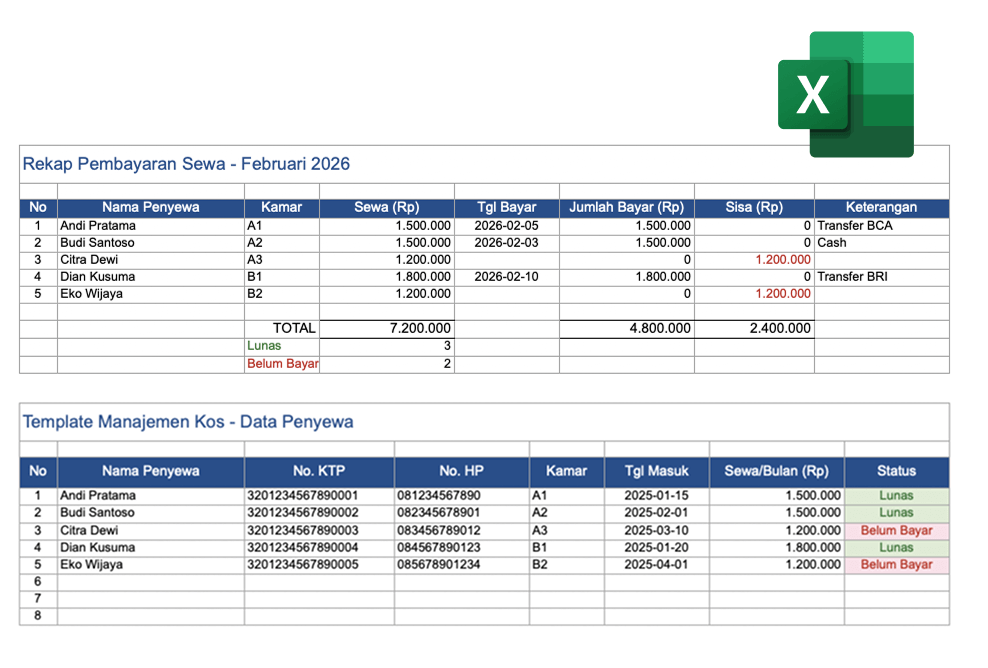
| No | Date | Tenant Name | Room | Rent | Amount Paid | Balance | Method | Notes |
|---|---|---|---|---|---|---|---|---|
| 1 | 2026-02-05 | Andi Pratama | A1 | 1,500,000 | 1,500,000 | 0 | Bank transfer | Paid Feb |
| 2 | 2026-02-03 | Budi Santoso | A2 | 1,500,000 | 1,500,000 | 0 | Cash | Paid Feb |
| 3 | 2026-02-10 | Citra Dewi | A3 | 1,200,000 | 0 | 1,200,000 | - | Unpaid |
| 4 | 2026-02-10 | Dian Kusuma | B1 | 1,800,000 | 1,800,000 | 0 | Bank transfer | Paid Feb |
| 5 | 2026-02-15 | Eko Wijaya | B2 | 1,200,000 | 0 | 1,200,000 | - | Unpaid |
| TOTAL | 7,200,000 | 4,800,000 | 2,400,000 | Paid: 3, Unpaid: 2 |
Things to note
- The “Balance” column is crucial for tracking arrears. With the formula
=Rent - Amount Paid, Excel automatically calculates who still has an outstanding balance - The “Method” column helps when reconciling with bank statements
- The “Notes” column is for additional context like “Partial payment, rest end of month”
- Create one sheet per month to keep things organized and easy to compare
Tip: Don’t mix security deposits with rent income. Deposits are not income—they’re a liability that must be returned. Create a separate table for deposits.
Example 2: Expense bookkeeping
Recording income alone isn’t enough. Without expense records, you can’t calculate net profit.
Expense table format
| No | Date | Category | Description | Room/Area | Amount | Method | Receipt |
|---|---|---|---|---|---|---|---|
| 1 | 2026-02-01 | Operations | Common area electricity | Common | 450,000 | Auto-debit | Yes |
| 2 | 2026-02-01 | Operations | Water utility | Common | 280,000 | Transfer | Yes |
| 3 | 2026-02-01 | Operations | WiFi internet | Common | 500,000 | Auto-debit | Yes |
| 4 | 2026-02-05 | Operations | Security staff salary | Common | 800,000 | Cash | Receipt |
| 5 | 2026-02-08 | Maintenance | AC servicing | A1, A2 | 300,000 | Cash | Receipt |
| 6 | 2026-02-12 | Repairs | Pipe leak fix | B1 | 350,000 | Cash | Receipt |
| 7 | 2026-02-15 | Maintenance | Light bulbs, cleaning supplies | Common | 85,000 | Cash | Receipt |
| 8 | 2026-02-20 | Admin | Neighborhood security fee | Common | 70,000 | Cash | Receipt |
| TOTAL | 2,835,000 |
Recommended expense categories
Don’t go overboard or too minimal. These four categories work for most rental properties:
| Category | Examples | Frequency |
|---|---|---|
| Operations | Electricity, water, internet, staff wages | Monthly |
| Maintenance | AC servicing, pest control, supplies | Periodic |
| Repairs | Pipe leaks, broken locks, repainting | Unplanned |
| Admin | Taxes, neighborhood fees, insurance | Monthly/annual |
Important: Record even the smallest expenses. Buying a light bulb for $1, paying a handyman $4—these small costs add up. Over a year, they can total hundreds of dollars.
Example 3: Monthly summary (profit and loss)
This is the overview that combines income and expenses into one complete picture.
Monthly summary format
FINANCIAL SUMMARY - KOS GRIYA ASRI
Period: February 2026
========================================

A. INCOME
   Room rent (5 rooms)        : 7,200,000
   Tenant utility charges     :   750,000
   Late fees                  :    50,000
   ----------------------------------------
   TOTAL INCOME               : 8,000,000

B. EXPENSES
   Fixed operations           : 2,030,000
   Maintenance                :   385,000
   Repairs                    :   350,000
   Administration             :    70,000
   ----------------------------------------
   TOTAL EXPENSES             : 2,835,000

C. SUMMARY
   NET PROFIT (A-B)           : 5,165,000
   Profit Margin              : 64.6%
   Occupancy Rate             : 100% (5/5 rooms)
   Collection Rate            : 66.7% (3/5 paid)
   Outstanding Arrears        : 2,400,000

D. NOTES
   - Citra (A3) and Eko (B2) haven't paid
   - Room B1 pipe fixed
   - Room A1 and A2 AC serviced
Key metrics to track
| Metric | Formula | Healthy Target |
|---|---|---|
| Profit margin | Profit ÷ Income × 100% | 60-75% |
| Occupancy rate | Occupied rooms ÷ Total rooms × 100% | Above 85% |
| Collection rate | Payments received ÷ Total billed × 100% | Above 90% |
| Cost per room | Total expenses ÷ Number of rooms | Lower is better |
For deeper analysis on these metrics, read how to create clean rental financial reports.
Example 4: Tenant data records
Beyond finances, tenant data is also an important part of rental bookkeeping.
Tenant data table format
| No | Name | ID Number | Phone | Room | Move-in Date | Rent/Month | Status |
|---|---|---|---|---|---|---|---|
| 1 | Andi Pratama | 3201234567890001 | 081234567890 | A1 | 2025-01-15 | 1,500,000 | Paid |
| 2 | Budi Santoso | 3201234567890002 | 082345678901 | A2 | 2025-02-01 | 1,500,000 | Paid |
| 3 | Citra Dewi | 3201234567890003 | 083456789012 | A3 | 2025-03-10 | 1,200,000 | Unpaid |
| 4 | Dian Kusuma | 3201234567890004 | 084567890123 | B1 | 2025-01-20 | 1,800,000 | Paid |
| 5 | Eko Wijaya | 3201234567890005 | 085678901234 | B2 | 2025-04-01 | 1,200,000 | Unpaid |
Additional information to include
- Move-out date (if known)
- Emergency contact
- Security deposit (amount paid)
- Special notes (allergies, shift work schedule, etc.)
Tip: Tenant ID data is sensitive. If using a spreadsheet, make sure the file is password-protected. A more secure alternative: use an app that stores data with encryption like Kamaru. Read the guide to managing tenant documents digitally for full details.
Free Excel template
We’ve prepared an Excel template that covers all the examples above. The template includes:
Available sheets
- Payment Recap — Monthly rent income table with automatic formulas (totals, paid/unpaid counts)
- Tenant Data — Complete tenant database with ID numbers, contacts, and status
How to use the template
- Download the template from the link below
- Duplicate the “Payment Recap” sheet for each new month (right-click tab → Move or Copy → Create a copy)
- Fill in tenant data in the “Tenant Data” sheet when new tenants arrive
- Update payments every time a payment comes in
- Review the recap at the end of each month
Download template
Template advantages
- Automatic formulas for totals and balances
- Conditional formatting: green for paid, red for unpaid
- Print-ready (A4 format)
- Works with both Excel and Google Sheets
Excel template limitations
While useful, Excel templates have limitations:
- No automatic reminders — You have to remember who hasn’t paid
- ID photos stored separately — Photo files must be kept in a separate folder
- Prone to typos — No input validation for ID numbers or amounts
- Hard to use on mobile — Spreadsheets aren’t comfortable to edit on small screens
- No automatic backup — Unless using Google Sheets or OneDrive
- Not connected — Tenant data, payments, and reports are in different sheets without integration
The automatic method: app-based bookkeeping
If you manage more than 5 rooms or want a more practical process, the automatic method saves time and reduces errors.
How it works in Kamaru
With Kamaru, bookkeeping happens automatically as you manage your property day-to-day. No separate sheets to fill in—everything is integrated.
Recording income:
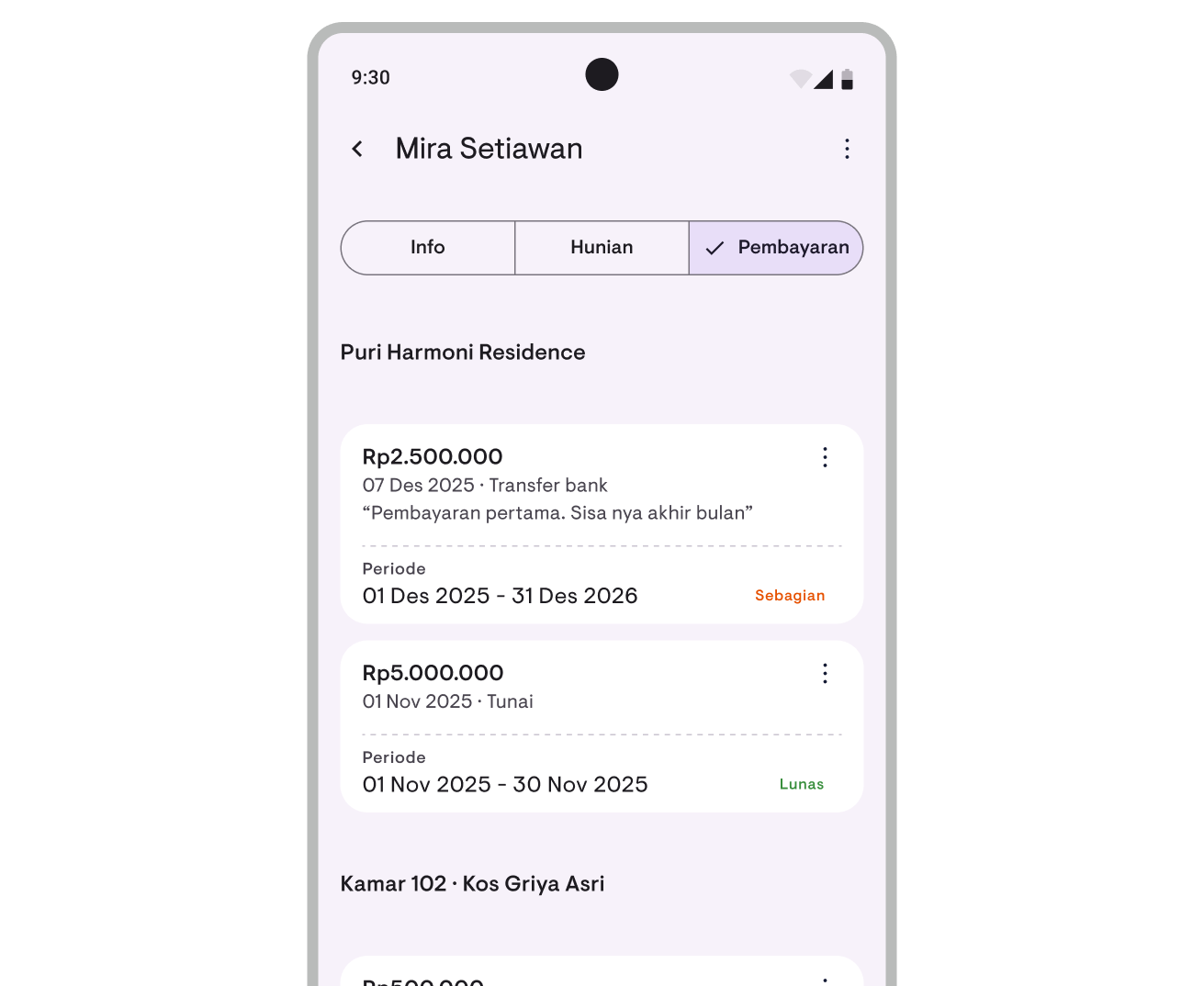
Every time you log a rent payment, the data automatically feeds into your financial report. Including tenant name, room, date, amount, and payment method.
Recording expenses:
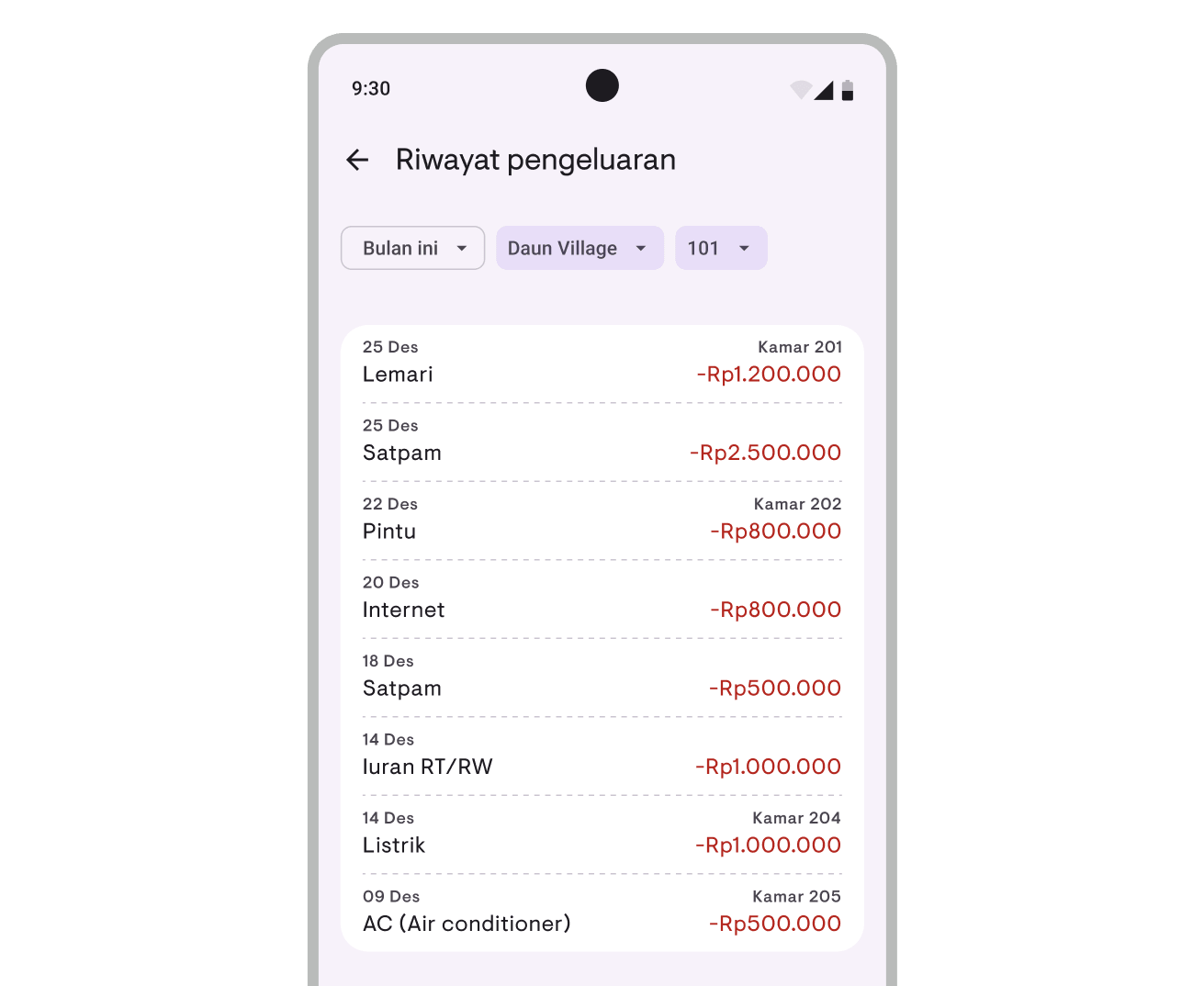
Log operational, maintenance, and repair expenses directly in the app. Pick a category, enter the amount, and you’re done.
Automatic reports:
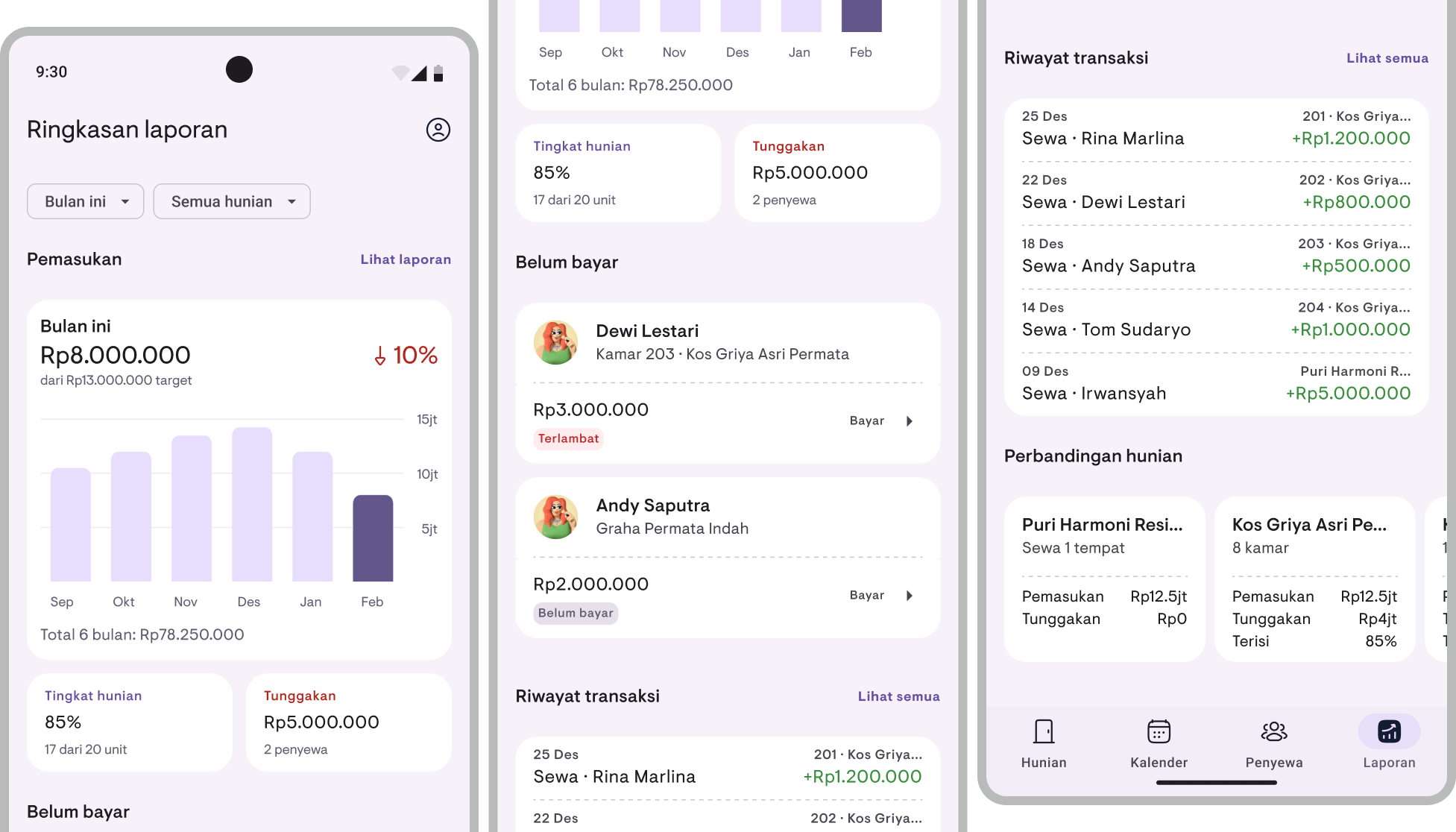
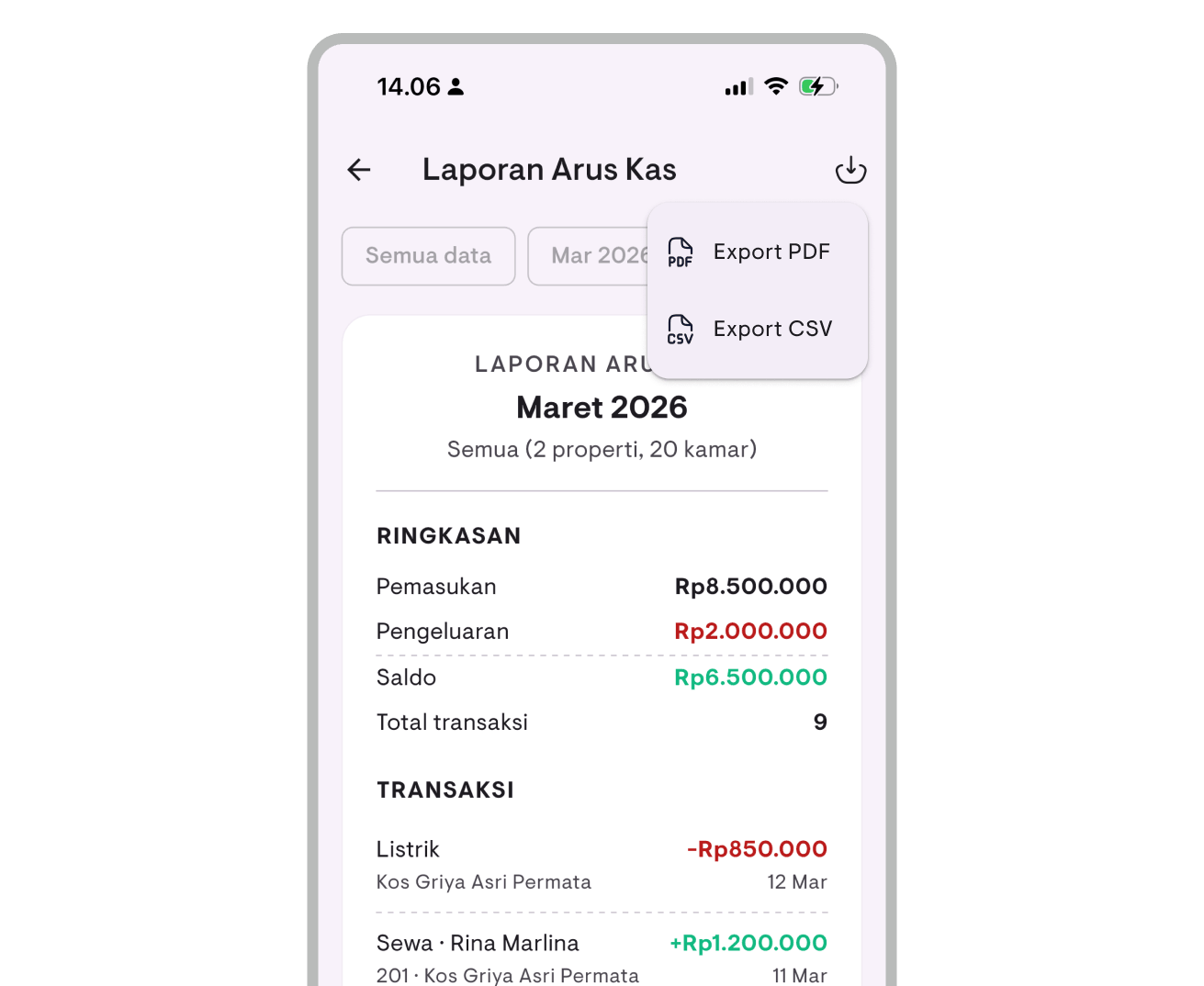
From the data you’ve recorded, Kamaru automatically calculates financial summaries—income, expenses, balance, arrears, and occupancy rate. Filterable by property and time period.
Export reports:
Need reports in a file format? Export to PDF or CSV directly from the app.
Learn more about these features in the financial report guide and expense tracking guide.
Comparison: Excel vs automatic method
| Criteria | Excel Template | Kamaru |
|---|---|---|
| Price | Free | Free (basic features), Pro for full reports |
| Setup time | 15-30 minutes | 5 minutes |
| Data entry | Type manually | Record payment → automatically in report |
| Reports | Create manually each month | Automatic from recorded data |
| Mobile access | Limited | Full |
| ID photos | Separate folder | Integrated in tenant profile |
| Backup | Manual (unless Google Sheets) | Automatic cloud backup |
| Arrears reminders | None | Coming soon |
| Best for | Small properties (1-5 rooms) | All property sizes |
Recommendation
- 1-5 rooms, just starting out: The Excel template is sufficient. Focus on building consistent recording habits first
- 5-10 rooms: Consider switching to an app. The time saved from manual entry starts to add up
- 10+ rooms: Strongly recommended to use an app. Managing spreadsheets for dozens of tenants and transactions per month becomes exhausting
Tips for consistent bookkeeping
Whichever method you choose, the key to success is consistency. Here are tips to keep your bookkeeping clean:
Record immediately
Don’t delay. The moment a payment comes in—whether by transfer or cash—record it right away. Delaying even one day can make you forget details like the exact amount or payment method.
Set a review schedule
Set aside 15-30 minutes at the end of each week to review your records. Make sure all payments are recorded and nothing is missed. At month-end, create a full summary.
Save all receipts
Photograph every receipt and invoice. For bank transfers, screenshot the proof. Save them in a digital folder organized by month.
Separate business accounts
If all rental transactions go through a separate bank account, reconciliation becomes much easier—just match your records against the bank statement.
Don’t skip small expenses
Bought a broom for $2? Record it. Replaced a light bulb for $1? Record it. Small expenses that go unrecorded can add up to hundreds of dollars per year, making your profit look larger than reality.
Common bookkeeping mistakes
Only recording income
This is the most common mistake. Many landlords are diligent about recording who has paid but never record expenses. The result: the profit that “feels” large turns out to be far less impressive once all costs are accounted for.
Recording deposits as income
Security deposits are not income. They’re a liability that must be returned when the tenant leaves. Mixing them with rental income will distort your financial reports and potentially cause you to overpay taxes.
Being inconsistent
Diligently recording in January and February, then skipping until June. Three months of missing data is extremely difficult to reconstruct, making annual reports inaccurate.
Using too many formats
Income in a notebook, expenses in a phone notes app, tenant data in WhatsApp. When you need a recap, you’re opening 3-4 different sources. Use one system—whether it’s Excel or an app.
For more mistakes to avoid, read 10 fatal mistakes rental property owners make.
FAQ
Are landlords legally required to keep books?
In most countries, anyone earning rental income must keep records for tax reporting purposes. Practically speaking, bookkeeping is also essential to understand your property’s real financial health.
How often should I update my bookkeeping?
Ideally, every time there’s a transaction. At minimum, weekly for review and monthly for summaries. The more frequently you update, the more accurate your records.
Can I use Google Sheets instead of Excel?
Yes, and it’s actually better in some ways. Google Sheets is free, automatically saved to the cloud, and accessible from your phone. Our template is also compatible with Google Sheets.
What if I’m starting late and have no records from previous months?
Start now. Don’t try to reconstruct past data—that will only frustrate you and make you want to give up. Focus on recording consistently from this month forward.
Can Kamaru fully replace Excel?
For payment tracking, tenant data, and financial reports—yes. Kamaru handles all of that in an integrated way. For highly custom needs (like complex pivot tables or specialized analysis), you can export data to CSV and process it in Excel.
Conclusion
Rental property bookkeeping doesn’t have to be complicated. What matters is choosing the right format and consistently filling it in. Start with the basics:
- Record every income — who paid, when, how much
- Record every expense — for what, how much, which category
- Create monthly summaries — calculate net profit, track key metrics
- Review and evaluate — compare month over month, identify issues
If you’re just getting started, download our free Excel template and start filling it in today. If you want something more practical, try the automatic method with an app.
Ready to clean up your rental bookkeeping? Download Kamaru for free—record payments, manage tenants, and view financial reports in one app. Setup takes just 5 minutes.
Related articles
Have questions or feedback? We'd love to hear from you. Email us.

Start managing for free today
Join other landlords who are already using Kamaru to manage their properties.

