
Automatic reminders for late-paying tenants
Stop checking your records one by one. Learn how to automatically detect which tenants are past due through notifications, without having to check manually every day.
Try to remember: today, which of your tenants are past their rent due date? If you only have one or two rooms, you might still be able to answer. But once the count grows, this question turns into work, pulling out your notebook or spreadsheet, walking through due dates one by one, cross-referencing with payments already received.
The problem isn’t that you’re lazy. The problem is that spotting who’s late is repetitive work that’s easy to miss. You get busy, forget to check for a few days, and suddenly a tenant is three weeks late without you realizing it. Arrears grow quietly precisely because they weren’t caught early.
In this article, you’ll learn how to automate the detection of late-paying tenants, letting the system check every day and tell you who’s past due, instead of you having to check manually. We’ll cover why manual checking often fails, how automatic detection works, and how to set it up in Kamaru.
Tired of checking your records one by one every day? Try Kamaru free, setup takes only 5 minutes.
Why manual arrears checking always loses
Detecting late tenants manually sounds simple, but in practice it almost always leaks. Here’s why.
You have to remember to check
Manual detection has one fatal flaw: it depends on you to initiate. Nothing reminds you that “today I should check arrears.” As a result, checks only happen when you happen to remember, and that’s often already too late.
Every room has to be checked separately
To know who’s late, you need to compare two things for each tenant: the due date and the payment status. With 5 rooms this might still be fast. With 20 or 30 rooms, this becomes tedious work where it’s easy to miss a line or two.
Grace periods make the math even messier
Many owners give a grace period, for example, 3 days after the due date before someone is counted as late. That means for every tenant, you’re not just comparing dates but also computing day differences and cross-checking against your grace policy. Easy to miscalculate in your head.
Late detection = bigger arrears
The longer arrears go undetected, the harder they are to collect. A tenant 3 days late is usually just forgetful. One 30 days late has developed a habit of delay. Early detection is the key, and early detection is only possible if you know the same day, not next week.
The root of the problem is the same as arrears accumulating in general, which we cover thoroughly in 8 ways to reduce rental payment arrears. One of its pillars is early detection, and that’s where automation matters most.
The difference between “reminders to tenants” and “late detection for you”
An important distinction that often gets confused.
Reminders to tenants are messages you send to tenants, via WhatsApp, for example, to remind them to pay. That topic, along with sample message templates, is covered in 8 ways to reduce rental payment arrears.
Late detection for you is different. This is about you being notified who’s past due, so you know whom to follow up with. Without this step, you don’t even know whom to remind.
This article focuses on the second: how the system automatically flags late tenants and tells you, so you no longer need to check manually.
How automatic detection works in Kamaru
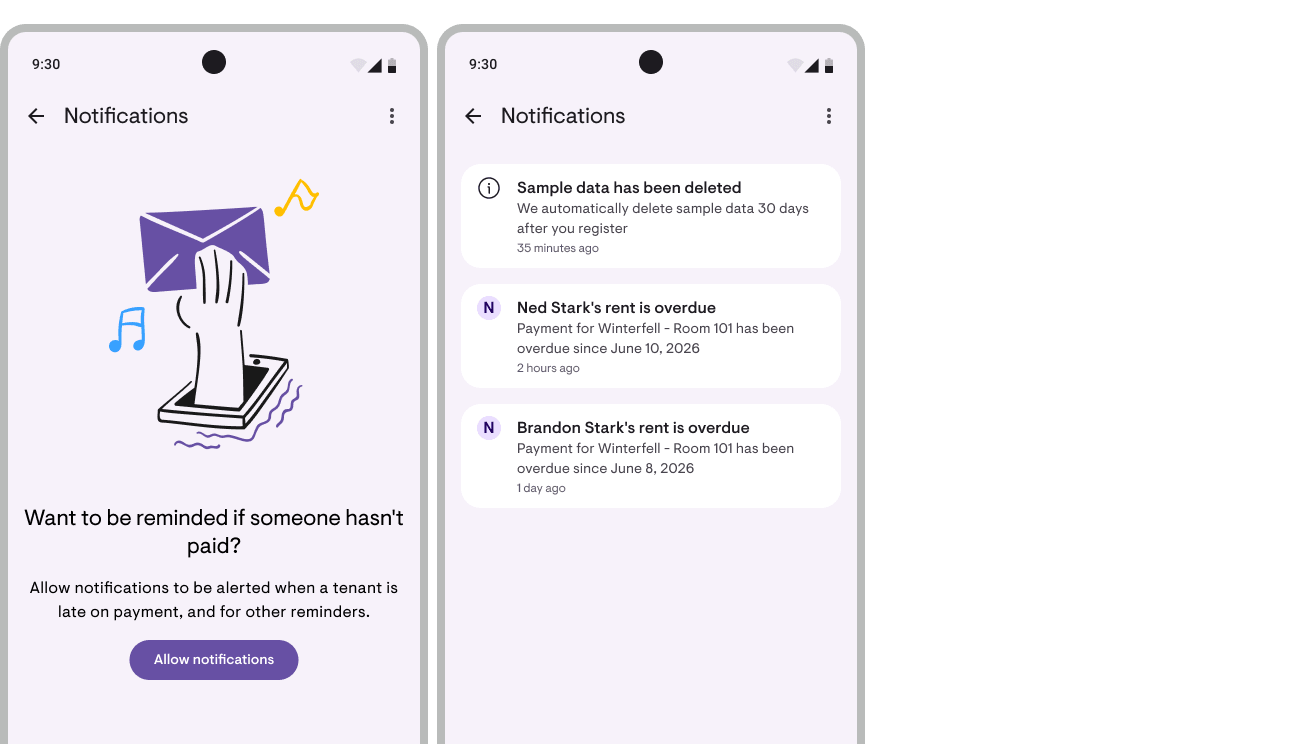
Kamaru has a notification system that combines push notifications (alerts that appear on your phone screen) and an in-app notification list. The core idea: you no longer need to check arrears manually, Kamaru does it for you.
Daily automatic checks
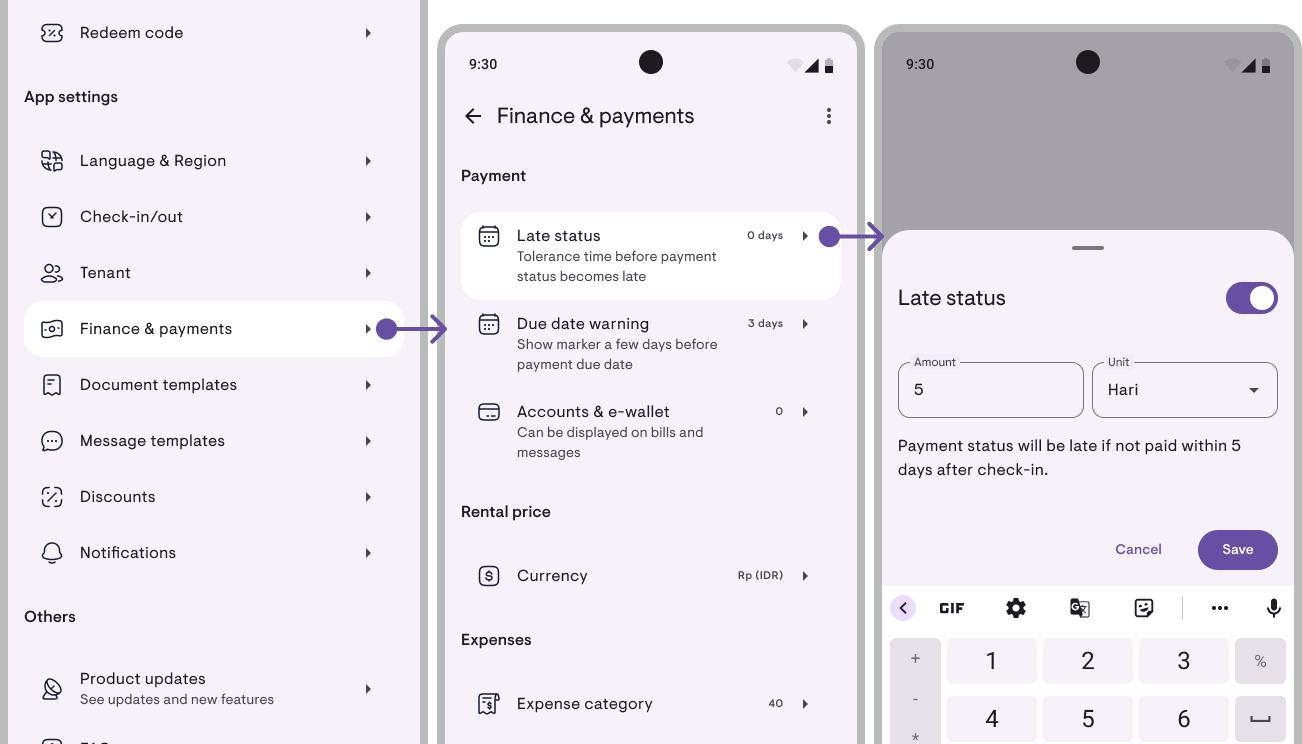
Every day, around 8 AM, Kamaru runs an automatic check across all your tenants. The system looks for anyone whose rent has passed its due date, while respecting the grace period you’ve set. So if you set a grace period of 3 days, a tenant is only flagged as late after they pass that threshold, not exactly on the due date.
Important: this late detection uses the same grace period setting as every other part of the app. There’s no separate setting that can drift out of sync.
Grouped notifications, not spam
One concern with notifications is your phone getting flooded with alerts. Kamaru avoids this by grouping the check results into a single morning digest.
- If only one tenant is late (and no other signals), the notification names that tenant directly: e.g. “Andy’s rent is late” with period details in the body.
- If there are several, or combined with other signals like tenants checking in today or rent about to fall due, Kamaru summarizes it as “Today’s summary” with a body like “This morning: 5 unpaid.”
So every morning you just check one notification to know whether anything needs follow-up, not dozens of separate alerts.
Part of the morning daily briefing
Late payment detection is actually part of a daily briefing that runs every morning. Besides late tenants, the same briefing also covers:
- Rent about to fall due in the next few days (the window is configurable)
- Tenants checking in today
All three roll up into a single morning notification, less alert noise, one quick read covers everything you need to attend to that day.
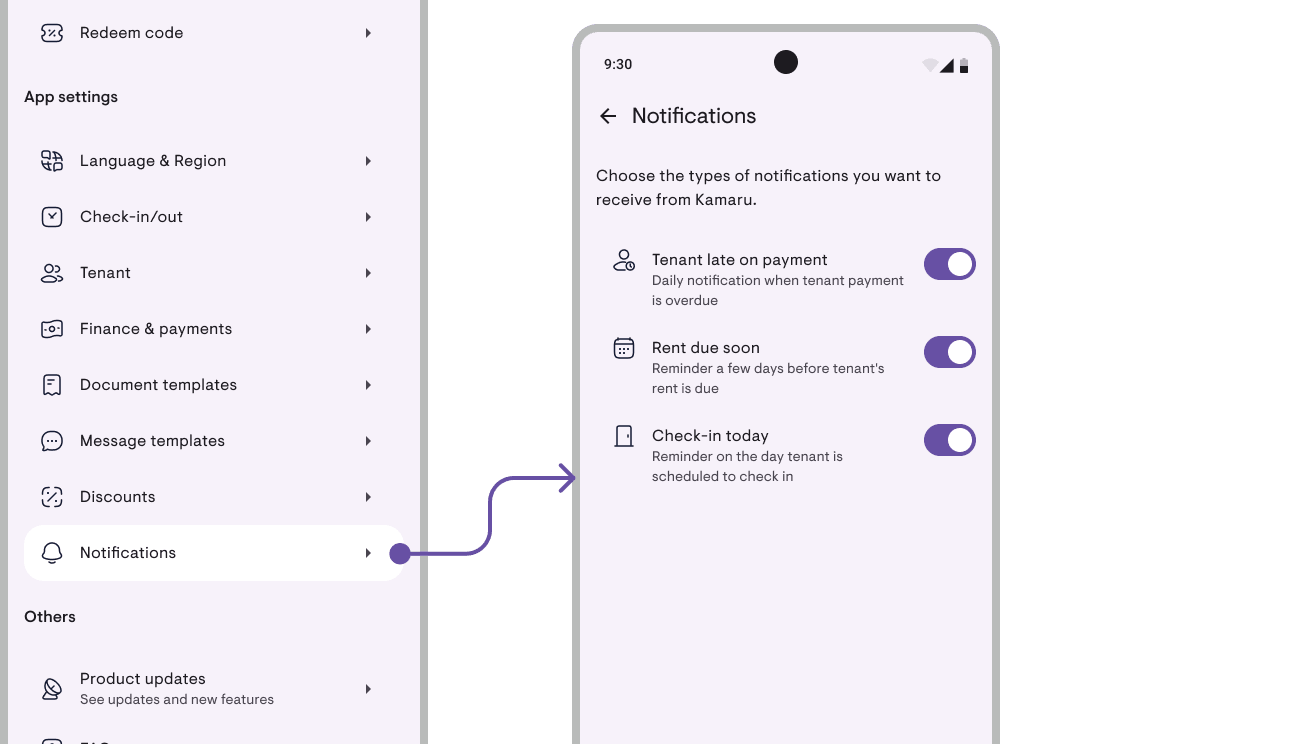
Each signal has its own toggle in Settings. If you only want late-payment alerts (disabling due-soon and check-in-today), that’s fine. The “Late-paying tenants” toggle is independent from the others.
Bell and badge on the properties screen
Beyond push notifications, there’s a bell icon with a badge (a number indicator) on the main properties screen. The badge shows the count of unread notifications, so even if you miss the push, you still see there’s something to check as soon as you open the app.
How to set up and use late detection in Kamaru
Here are the practical steps from the start.
Step 1: Make sure late-payment notifications are on
In Settings, there’s a “Late-paying tenants” toggle to turn this type of notification on or off. Make sure it’s enabled so you receive the daily check. If you ever decide you don’t need it, you can turn it off without affecting other features.
Step 2: Make sure the grace period fits
Because late detection uses the app’s grace period setting, make sure the value matches your rental policy. If you typically give a few days of tolerance, set that grace here, so tenants are only flagged late after crossing the grace, not exactly on the due date.
Step 3: Let Kamaru work every morning
Once enabled, you don’t need to do anything else. Every morning around 8 AM, Kamaru checks and sends you a notification if anyone is late. No one late? No notification bothering you.
Step 4: Follow up from the notification
When you receive a notification, tap it to open the relevant tenant’s details directly. From there you can see the invoice and follow up, for example, sending a reminder to the tenant via WhatsApp. You don’t have to hunt for which tenant it was; Kamaru takes you straight there.
Step 5: Manage the notification list
Inside the app there’s a notification list that keeps your alert history. Here you can:
- Mark notifications as read or unread
- Delete notifications that are no longer relevant
- Mark all as read in one action
This keeps the bell and badge meaningful, the number that shows actually represents what you haven’t handled.
Want to know who’s late without the hassle of checking? Start free with Kamaru, late-payment notifications are included at no extra cost.
Good news: this feature is free
Many advanced features in property-management apps sit behind a subscription. But late-payment notifications in Kamaru are free, you don’t need Pro to use them.
That means this automatic detection is available from day one, even on the free version. For small rental businesses just starting to clean up their records, it’s an ideal starting point: let the system watch while you focus elsewhere.
If you later need deeper analysis, for instance, seeing how long each arrear has been running and the total amount held up, that lives in the financial reports.
Automatic detection isn’t a substitute for follow-up
To be honest: the notification only tells you who is late. What you do next still determines whether the arrears get resolved.
The notification is a trigger, not a final solution. Once you know who’s late, the next step is to follow up consistently, sending polite reminders, recording payment promises, and escalating collection steps if there’s no response.
To track incoming payments after you follow up, see the payment tracking guide. That way, tenant status updates immediately and the next morning’s notifications stay accurate.
Do’s and Don’ts
Do ✅
- Turn on the “Late-paying tenants” notification from the start
- Set the grace period to match your rental policy
- Follow up from the notification the same day
- Mark notifications as read after handling them
- Update payment status whenever funds come in
Don’t ❌
- Rely on memory to know who’s late
- Manually check arrears line by line every day
- Ignore an accumulating bell badge
- Let notifications pile up without follow-up
- Turn off notifications and forget to check them at all
FAQ
Do I still have to check arrears manually?
No. That’s exactly the point. Kamaru runs automatic checks every morning and tells you if any tenant is late. Your job is to follow up, not to detect.
What time are notifications sent?
The check runs every day around 8 AM. If any tenant is past due (and past the grace period), you’ll receive a single summary notification for that day’s check.
What if many tenants are late at once, will my phone get flooded?
No. Kamaru groups the check results into a single morning digest. If several tenants are late (or there are other signals like today’s check-ins / rent about to fall due), you receive a summary like “Today’s summary, This morning: 5 unpaid.”, not separate notifications for each.
What happens when I tap the notification?
The notification takes you straight to the relevant tenant’s details, so you can see the invoice and follow up without hunting around.
Is the grace period respected?
Yes. Late detection respects the same grace-period setting as the rest of the app. Tenants are only flagged late after passing the grace period you’ve set, not exactly on the due date.
Is this feature paid?
No. Late-payment notifications are free in Kamaru, you don’t need Pro to use them.
Conclusion
Arrears most often grow quietly, not because you don’t care, but because detecting who’s late is repetitive work that’s easy to miss. Once room count grows, checking manually every day becomes unrealistic.
The solution is to flip the burden: let the system check every morning and tell you who’s past due. With automatic detection that respects your grace period, notifications grouped neatly, and a direct link to tenant details, you can follow up faster, and early detection is the most effective way to keep arrears small.
Ready to stop checking records one by one? Try Kamaru free today. Turn on late-payment notifications, and let Kamaru check every morning while you focus on managing your rentals. Setup takes only 5 minutes, no credit card required.
Related articles
Have questions or feedback? We'd love to hear from you. Email us.
Start managing for free today
Join other landlords who are already using Kamaru to manage their properties.

