
7 Best Kos Management Apps 2026 (Full Review)
Honest review of the 7 best kos (boarding house) management apps in Indonesia 2026. Compare features, pricing, pros & cons before choosing.
Finding a kos management app that actually helps — rather than adding more complexity — is harder than it sounds. There are dozens of options on the Play Store and App Store, but not all of them are built for the unique needs of kos (Indonesian boarding house) owners.
If you’re not familiar with the term, a “kos” (or “kos-kosan”) is a type of rental property unique to Indonesia — think of it as a boarding house with individual rooms rented out monthly, typically to students and young professionals. It’s one of the largest rental property segments in Southeast Asia, with millions of tenants across cities like Yogyakarta, Malang, Bandung, and Semarang.
Despite the scale of this market, many kos owners still manage their properties manually: handwritten notebooks, mental reminders, and makeshift reports cobbled together at the end of each month. A single bookkeeping mistake can mean millions of Rupiah (hundreds of dollars) lost without even noticing.
That’s why choosing the right kos management app isn’t just about convenience — it’s about the long-term sustainability of your rental business.
We’ve tested and compared 7 of the best kos management apps available in 2026. From free apps for beginners to paid platforms with enterprise-level features for owners managing dozens or hundreds of rooms.
In this review, you’ll find:
- Key features of each app
- Honest pros and cons
- Pricing and available plans
- Recommendations based on your property type and scale
Jump straight to the comparison? See the table here.
Don’t want to spend time choosing? Kamaru is a kos management app with AI-powered ID card scanning and payment tracking — core features are free, with Pro ($15/mo) for advanced reports and export. Try Kamaru — setup takes 5 minutes.
How We Evaluated These Apps
Not all apps are created equal. We rated each app based on 5 key criteria:
- Ease of use — How quickly can you get started without special training
- Core features — Tenant management, rent payment tracking, and financial reports
- Platform availability — Android, iOS, and/or web
- Pricing — Is there a free version that’s actually useful?
- User support — Responsiveness of the support team and documentation quality
We also considered factors specific to managing properties in Indonesia: ease of scanning tenant ID cards (KTP), Indonesian language support, and integration with local payment methods like bank transfers and QRIS.
Quick Comparison: 7 Best Kos Management Apps 2026 {#comparison-table}
| App | Platform | Price | AI ID Scan | Financial Reports | Best For |
|---|---|---|---|---|---|
| Kamaru | iOS, Android | Free / Premium $15/mo | ✅ | ✅ | All property sizes |
| SuperKos | iOS, Android, Web | ~$0.35/room/mo (30-day trial) | ❌ | ✅ | 15+ rooms |
| Papikost | Android, Web | Free / ~$30 per 6 mo | ❌ | ✅ | Management + marketing |
| Kosanku | Android | Freemium (PRO paid) | ❌ | ✅ | Mixed property types |
| KelolaPro | Android | Free / Premium ~$6/mo | ❌ | ✅ | Auto WhatsApp billing |
| Mamikos (Owner) | iOS, Android | GoldPlus from ~$3.50/mo | ❌ | Basic | Marketplace exposure |
| Excel/Google Sheets | Web, Desktop | Free | ❌ | Manual | 1-5 rooms |
7 Best Kos Management Apps 2026
1. Kamaru — Best Overall
Platform: iOS, Android | Price: Free / Premium $15/month
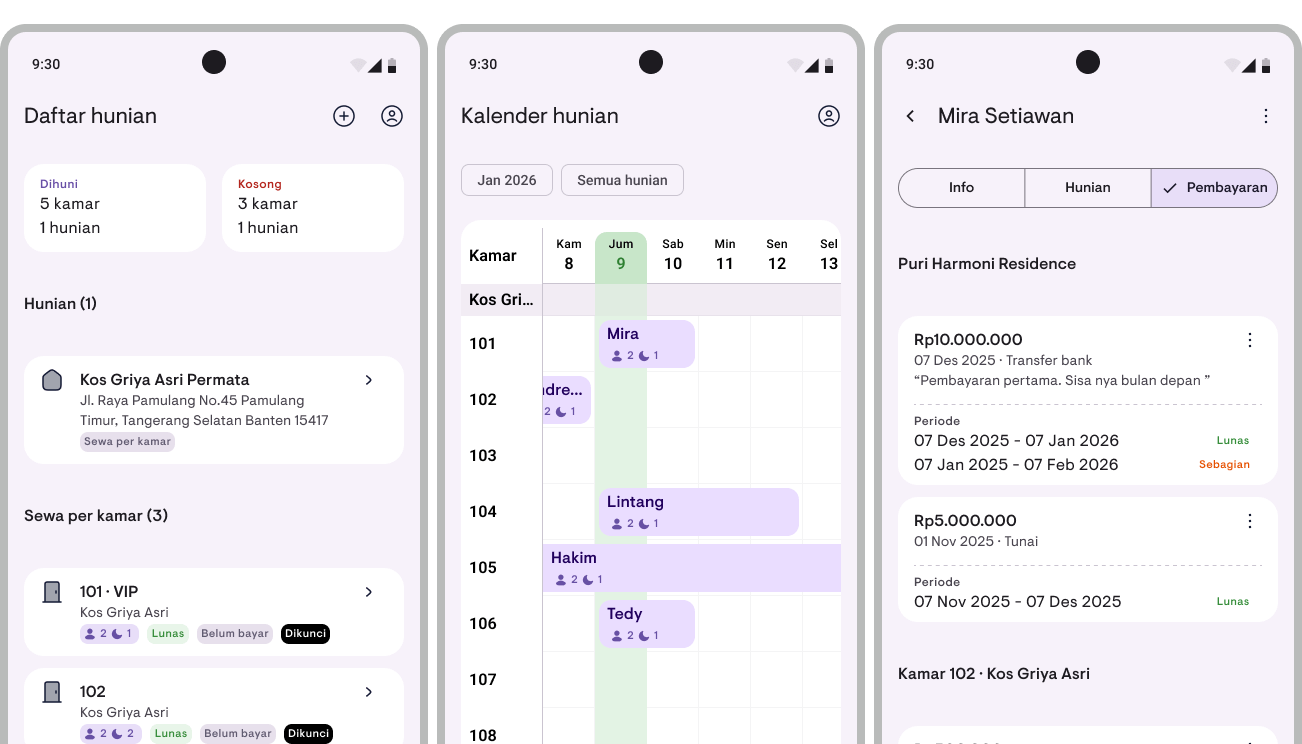
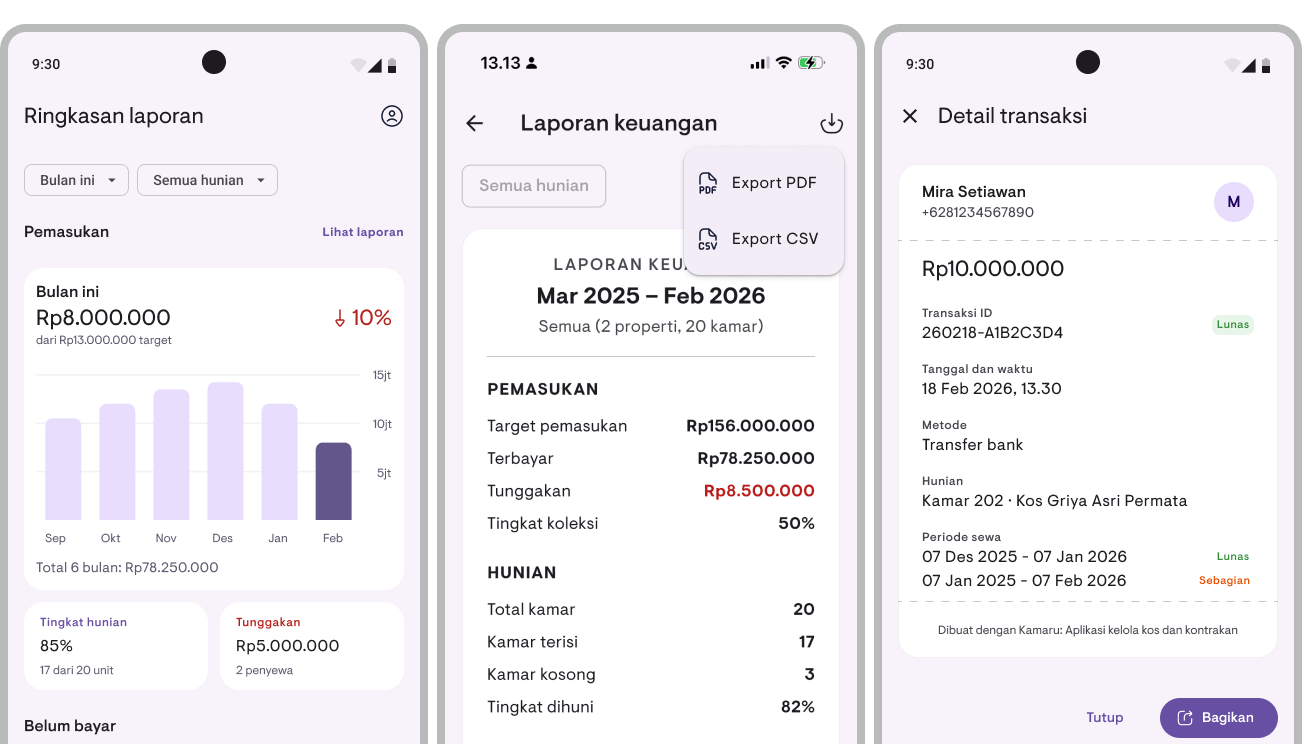
Kamaru is a free kos management app built specifically for the Indonesian rental market. What sets it apart from competitors is its AI-powered ID card scanning — simply photograph a tenant’s KTP (Indonesian ID card), and their data is automatically populated in seconds. No manual input, no risk of typos on names or ID numbers.
Key features:
- Modern, user-friendly UI — no training needed
- AI-powered tenant ID card scanning (OCR)
- Calendar view — see each tenant’s stay period (check-in to check-out) in a single visual timeline
- Rent payment tracking with late payment detection
- Monthly and annual financial reports (Pro)
- Multi-property management from one account (5 properties free, more with Pro)
- Cloud-stored data — secure and accessible from anywhere
- Generate payment receipts and share via WhatsApp or other platforms
- Export data to CSV or PDF (Pro)
Pros:
Kamaru can be used right away with solid core features for free — AI ID card scanning, payment tracking, and calendar view. Advanced features like financial reports and data export are available on the Pro plan. Setup takes about 5 minutes. The first thing you’ll notice is the clean, modern UI — the design is intuitive and doesn’t feel overwhelming, even if you’ve never used a property management app before. No special training required to get started.
The AI ID card scanning feature is a significant differentiator — it cuts new tenant registration time from 10 minutes down to less than 2 minutes. Available on both iOS and Android with cloud-stored data and automatic backups, so you don’t have to worry about losing data if you switch phones.
Cons:
As a relatively new app, Kamaru is still evolving. The free tier is limited to 5 properties and receipts include a watermark — full financial reports and data export require a Pro upgrade. Some enterprise features like third-party payment gateway integration (Midtrans, Xendit) are also still on the development roadmap.
Best for: Kos owners of all scales — from 5 rooms to hundreds of units.
Download Kamaru: App Store | Google Play
2. SuperKos — Most Comprehensive for Mid-to-Large Properties
Platform: iOS, Android, Web | Price: ~$0.35/room/month (30-day free trial)
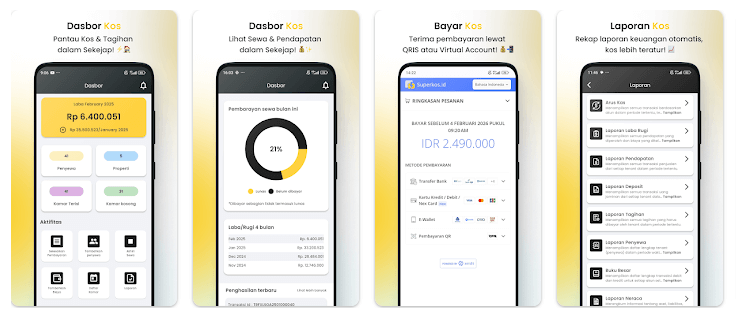
SuperKos positions itself as the most comprehensive kos management ecosystem in Indonesia — and that claim is largely justified. The platform offers automated billing via WhatsApp and email, payment gateway integration with providers like Midtrans and Xendit, and highly detailed financial reporting.
Key features:
- Automated billing via WhatsApp and email
- Payments via QRIS, bank transfer, convenience stores (Indomaret/Alfamart)
- Cash flow, profit & loss, and balance sheet reports
- Multi-property management from one account
- Access via web, iOS, and Android
Pros:
SuperKos’s digital payment integration is its main selling point. Tenants can pay rent through multiple methods without the owner needing to manually check — everything is recorded automatically. The financial reports are also very comprehensive, ideal for owners who need accurate data for tax purposes or investor reporting.
Cons:
Subscription pricing is calculated based on the number of rooms — the larger your property, the higher the cost. There’s no permanent free version, only a 30-day trial. This can be a barrier for small property owners just getting started.
Best for: Mid-to-large kos owners (15+ rooms) who need integrated digital payment systems and detailed financial reports.
3. Papikost — Management + Marketing in One Platform
Platform: Android, Web | Price: Free / ~$30 per 6 months
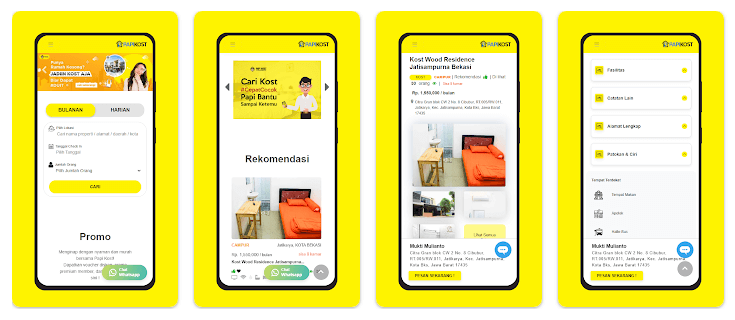
Papikost takes a unique approach: it’s not just an operational management tool, but also a marketing platform. Properties listed on Papikost have the opportunity to be promoted directly by their team — meaning you can attract new tenants while managing existing ones.
Key features:
- Online booking system for prospective tenants
- Virtual property tour scheduling
- Payment recording and due date reminders
- Integrated financial reports
- Property promotion through the Papikost platform
Pros:
The combination of management and marketing in one platform is a strong differentiator. If your property is struggling to fill empty rooms, Papikost offers a two-way solution: manage current tenants while attracting new ones. For more strategies on filling vacancies, check out our guide to filling rooms during slow season.
Cons:
The marketing features depend on the Papikost ecosystem — effectiveness varies based on how much traffic their platform gets in your city. In smaller cities, the reach may be limited.
Best for: Kos owners who need help filling empty rooms while managing existing tenants in one platform.
Manage your property more efficiently starting today. Kamaru offers AI ID card scanning, payment tracking, and calendar view for free — with Pro for financial reports and data export. Available on iOS and Android. Start now.
4. Kosanku — Flexible Across Property Types
Platform: Android | Price: Freemium (Kosanku PRO for full features)
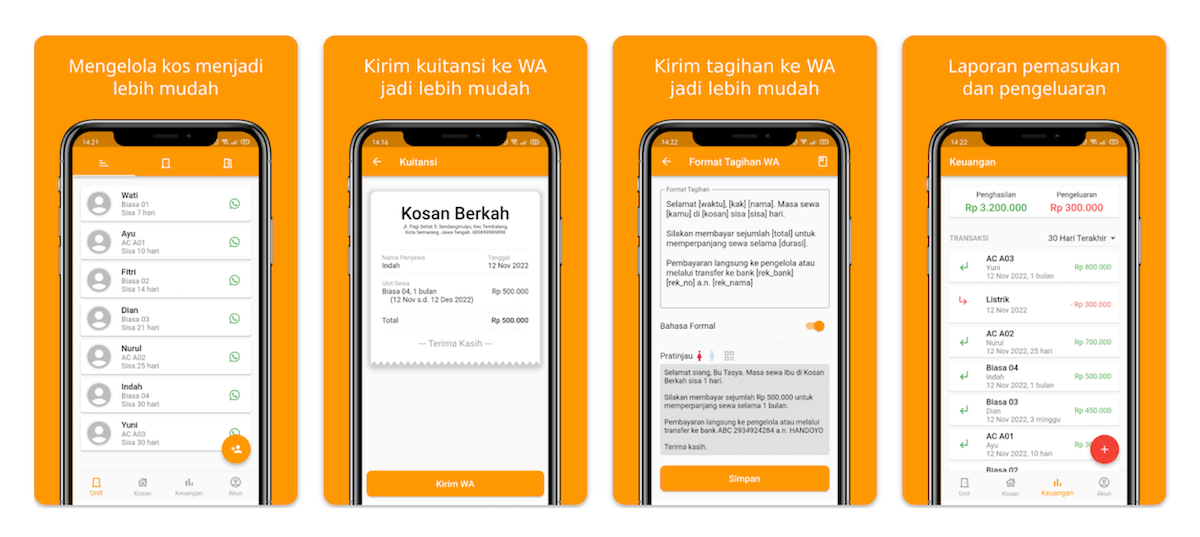
Kosanku is a flexible Android app that supports not only kos, but also rental houses (kontrakan), guesthouses, shophouses (ruko), and other rental unit types. This makes it an attractive choice for mixed-property owners who don’t want to use different apps for each property type.
Key features:
- Digital receipts (electronic)
- Customizable WhatsApp billing messages
- Payment due date lists
- Vacant and occupied unit tracking
- Export tenant and transaction data to Excel
- Income and expense reports
Pros:
The Excel export feature is a nice plus — you can take your data anywhere and process it as needed. Customizable WhatsApp billing messages also make tenant communication easier, especially since WhatsApp is the dominant messaging platform in Indonesia.
Cons:
The free version limits the number of units — for larger properties, you’ll need to upgrade to Kosanku PRO. The app is also Android-only, so iPhone users are out of luck.
Best for: Owners with mixed property types (kos + rental houses + shophouses) who use Android.
5. KelolaPro — Automated WhatsApp Billing
Platform: Android | Price: Free / Premium ~$6/month
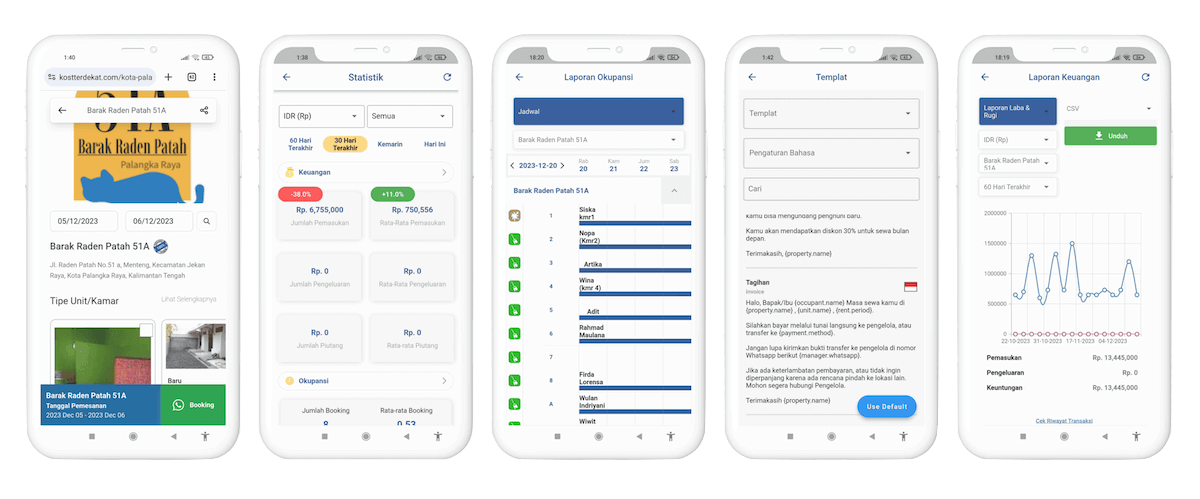
KelolaPro has been around since 2020 and continues to grow. Its primary focus is automating the rent collection process — sending invoices and due date reminders directly via WhatsApp automatically. Supports up to 8 properties in a single account.
Key features:
- Automated rent invoices and reminders via WhatsApp
- Tenant payments via QRIS
- Real-time occupancy and financial dashboard
- Multi-property support (up to 8 properties)
- Contract and tenant data management
- Income and expense tracking
Pros:
The automated WhatsApp billing reminder is KelolaPro’s main selling point — it saves you from having to chase tenants one by one. The real-time dashboard gives a quick overview of occupancy and cash flow across all properties at once. The Standard plan is free as a starting point.
Cons:
The interface (UI) feels dated and not particularly modern — navigation isn’t very intuitive, especially for users accustomed to contemporary app design. It takes longer to learn the workflow compared to competitors like Kamaru that are more user-friendly. Premium features like full multi-property support and QRIS require a paid upgrade. Android-only — no iPhone support. No AI-powered ID card scanning.
Best for: Kos owners who struggle with rent collection and want to automate WhatsApp-based billing reminders.
6. Mamikos (Owner Features) — Largest Marketplace Exposure
Platform: iOS, Android | Price: GoldPlus from ~$3.50/month
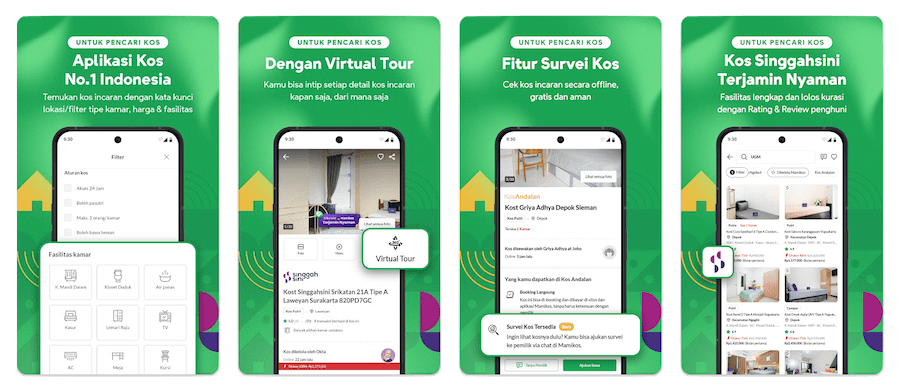
Mamikos is widely known as the largest kos search platform in Indonesia, with millions of active users. Besides serving as a tenant search tool, Mamikos also provides features for property owners (landlords) to manage their listings and tenant data.
Key features:
- Kos listings on the Mamikos platform with wide reach
- Chat feature with prospective tenants
- Room availability management
- Basic tenant data
Pros:
Mamikos’s main strength is the sheer scale of its platform — millions of kos seekers use Mamikos every month. If your property is newly established and needs exposure to a large pool of prospective tenants, listing on Mamikos provides visibility that’s hard to match with other apps.
Cons:
Some owners report that features that were previously free now require payment, including replying to messages from prospective tenants. Operational management features like payment tracking and financial reports are also limited compared to apps that are specifically focused on property management.
Best for: New kos owners who need to fill rooms first, before switching to a more comprehensive management app.
7. Excel / Google Sheets — For Those Just Starting Out
Platform: Web, Desktop, Mobile | Price: Free
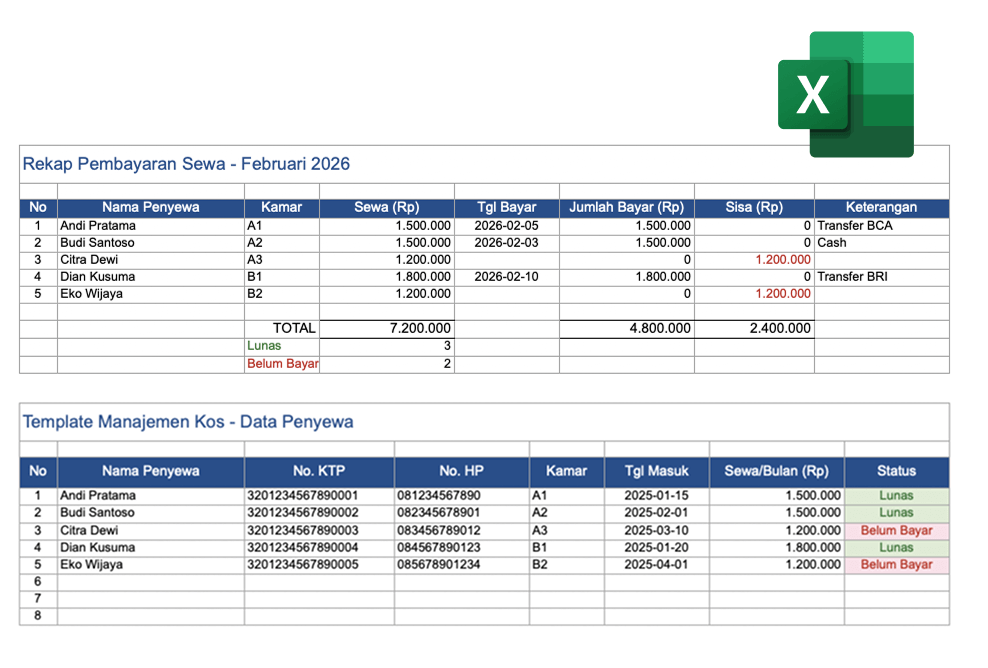
Many kos owners in Indonesia start their digitalization journey with a spreadsheet — and there’s nothing wrong with that. Excel or Google Sheets is a familiar starting point that’s free and flexible. But as your tenant count and property portfolio grow, the limitations become apparent quickly.
Free download: We’ve prepared a ready-to-use kos management Excel template complete with 2 sheets — tenant data (name, ID number, room, payment status) and monthly payment recap (including automatic formulas for totals and outstanding balances). Use it right away without building from scratch.
Pros:
Free with no subscription fees. No special app installation needed — just open Google Sheets in your browser or Excel on your laptop. Highly flexible for customization based on your property’s unique needs. Google Sheets also supports real-time collaboration if you have a co-manager or property manager helping with operations.
Cons:
Here’s where the problems start: no automatic reminders when tenants haven’t paid — you have to check manually one by one every month. Data entry is manual, making it prone to typos that lead to discrepancies in financial reports. No ID card scanning feature, no automatic receipts, and no built-in cloud backup (unless you use Google Sheets). The more tenants you have, the longer the spreadsheet gets, and the harder it becomes to find the data you need. For a deeper look at these risks, read 10 fatal mistakes kos owners should avoid.
Best for: Beginners with 1-5 rooms who aren’t ready to switch to a dedicated app. But we strongly recommend making the switch early — before manual bookkeeping mistakes start costing your business. If you’re already managing more than 5 rooms with Excel, it’s time to try Kamaru for free.
How to Choose the Right Kos Management App for You
With so many options, how do you pick the right one? Here’s a quick guide based on your situation.
If your property has 1-15 rooms and you’re just starting to go digital: Choose an app that’s easy to use with a solid free tier. Kamaru is the best choice — available on iOS and Android with AI ID card scanning that saves significant admin time. Core features are free, with Pro for advanced reports. Kosanku is a good Android alternative if you need flexibility across different property types.
If your property has 15-50+ rooms: Prioritize accurate financial reports and digital payment integration. Kamaru Pro offers comprehensive reports for all sizes, or SuperKos if you need fully integrated payment gateways.
If you own multiple properties of different types: Kosanku can manage various property types (kos, rental houses, shophouses) in one platform. Kamaru also supports multi-property management.
If you still have many empty rooms: Papikost or Mamikos offer marketplace exposure alongside management features. For more detailed strategies on filling rooms, check out how to fill kos rooms during slow season.
Platform considerations:
- Android only: Kosanku, KelolaPro
- iOS + Android: Kamaru, SuperKos, Mamikos
- Android + Web: Papikost
Most Important Features for Kos Owners
From experience talking to hundreds of kos owners, these are the features most frequently prioritized:
Rent payment tracking is the number one need. Almost all apps on this list provide it, but the quality and ease of use vary significantly. For a more detailed guide, read how to track rent payments with 3 methods.
Automated ID card scanning saves the most time when onboarding new tenants. Currently, only Kamaru offers this feature for free using AI technology. Learn more about how to process tenant ID cards in 2 minutes.
Automated financial reports help you monitor business health without having to create manual reports every month. For beginners, read our guide on how to create clean kos financial reports.
Multi-property support becomes important as your business grows. Make sure the app you choose doesn’t charge excessive additional fees when you add new properties.
Join hundreds of kos owners already working more efficiently. Kamaru offers core features for free on iOS and Android, with AI ID card scanning that cuts tenant registration time by up to 80%. Download Kamaru now.
Signs It’s Time to Switch to a Kos Management App
Still unsure whether you really need an app? Here are some signs you shouldn’t ignore:
You frequently forget who hasn’t paid rent. When you have more than 5-7 tenants, remembering everyone’s payment status becomes impossible without an organized system. Every month there’s a risk you’ll miss a tenant who’s behind on rent.
Your financial records are disorganized. If you struggle to answer simple questions like “what was the total kos income this month?” or “which room is vacant the most?”, that’s a sign your system isn’t working.
New tenant onboarding takes too long. Manual data entry from ID cards, creating contracts, storing documents — this can take 30-60 minutes per new tenant. With the right app, this process can be cut to under 10 minutes.
Tenant data is scattered across multiple places. Some in notebooks, some in WhatsApp messages, some in photos on your phone. When a tenant has a complaint or there’s an issue, you struggle to find the information you need.
If you experience one or more of these signs, it’s the right time to switch to an app. Also read 7 signs your kos needs a digital management system for a more complete guide.
FAQ
What is the best kos management app in Indonesia 2026?
For the best balance of features and ease of use, Kamaru is the top choice in 2026. Core features like AI ID card scanning, payment tracking, and calendar view are free on iOS and Android — with Pro available for financial reports and data export. For mid-to-large properties that need comprehensive payment gateway integration, SuperKos is worth considering despite its subscription cost.
Are there any truly free kos management apps?
There are several freemium options: Kamaru (iOS + Android, free core features including AI ID card scanning and payment tracking — financial reports and export require Pro), KelolaPro (Android, free Standard plan), and Excel/Google Sheets (fully free but manual). Kamaru’s free tier supports up to 5 properties with core management features.
Are kos management apps safe for storing tenant data?
Apps that use cloud storage with encryption like Kamaru are generally safer than manual records or local spreadsheets. Kamaru stores data on trusted cloud infrastructure with encryption and automatic backups. Always choose apps that are transparent about their privacy and data security policies.
Can I manage multiple properties in one app?
Yes. Kamaru, SuperKos, KelolaPro, and Kosanku all support multi-property management in a single account. This makes it easy for owners with more than one location to view all property performance from one dashboard.
How do I switch from Excel to a kos management app?
The process is easier than you’d think. With Kamaru, you can start by adding a new property, then input tenants using the AI ID card scanning feature — data is automatically populated from an ID card photo. Your old Excel data can still be referenced while you gradually migrate active data to the new system. For a property with 10-20 tenants, this process typically takes 1-2 days.
Do tenants need to install the app too?
No. All management is done by the property owner from one app — tenants don’t need to install anything. Billing communication can still be done via WhatsApp or any other method you normally use.
Conclusion
Choosing the right kos management app can save you dozens of hours of work every month and reduce the risk of costly bookkeeping errors. Out of the 7 apps we reviewed, each has its own strengths depending on your property’s scale and needs.
For the majority of kos owners — especially those just starting to go digital — Kamaru is the ideal starting point. Easy to use, available on iOS and Android, with core features free and AI ID card scanning that significantly cuts admin time. Upgrade to Pro when you need full financial reports and data export.
Ready to manage your kos more efficiently? Try Kamaru now — setup takes just 5 minutes.
Download on App Store | Download on Google Play
Related Articles
Have questions or feedback? We'd love to hear from you. Email us.

Start managing for free today
Join other landlords who are already using Kamaru to manage their properties.

